Mitti can be controller using MIDI from a MIDI device or even from softwares provide MIDI commands and controls. The MIDI specification itself multiple sub-protocols, and as an addition to ("musical") MIDI commands - MIDI Notes and Control Change messages - Mitti also can be controlled by MIDI Machine Control and MIDI Show Control messages at the same time.
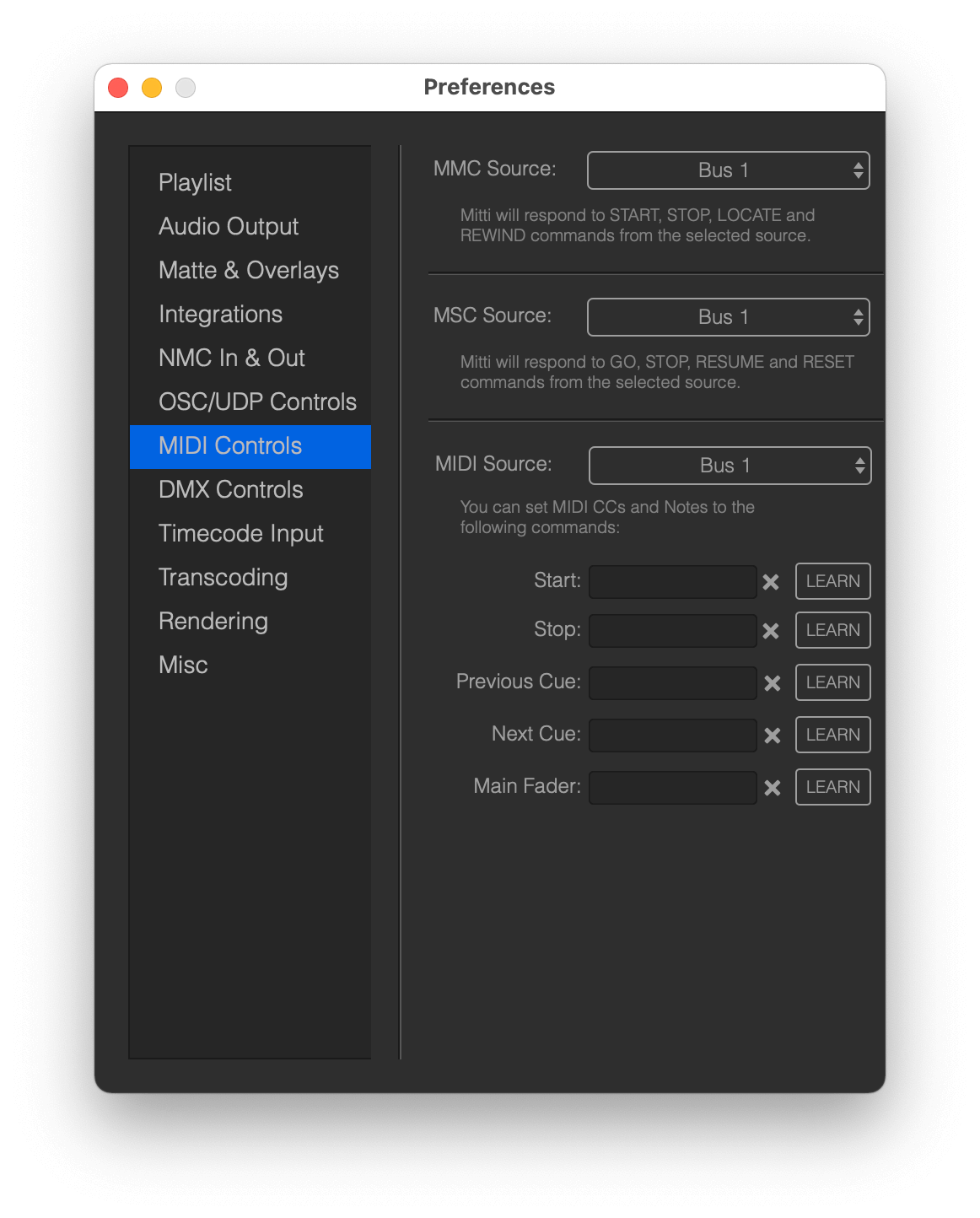
MIDI Controls Preferences are available from the Project Preferences window, and this is the place where you can select the sources for different incoming MIDI protocols.
MMC - MIDI Machine Control
MIDI Machine Control aka MMC is a subset of the MIDI protocol and while it originally designed to control recording environment, various DAWs and MIDI Controls are supporting them for both receiving and sending, mostly for transport controls and scrubbing on the timeline.
You can set a MIDI port for incoming MMC messages in MIDI Controls Preferences, and Mitti supports the following MMC commands:
- PLAY: starts playback from the current position.
- STOP: stops playback.
- REWIND: will rewind the Playlist to the beginning.
- LOCATE: set Mitti to the incoming SMPTE time.
Important: All MMC commands are ignored when Mitti is running as a timecode follower, the only exception is LOCATE which will be still processing.
Handle MMC Device IDs
Mitti 1.1.4 extended the MMC protocol supports in Mitti to handle DeviceIDs, making it possible to trigger specific Cues by sending a MMC Play message with the corresponding DeviceID. The following MMC commands and DeviceIDs are supported:
MMC Play:
- DeviceID 0: reserved, does nothing yet
- DeviceID 1-126: triggers Cue 1-126
- DeviceID 127: plays to current Cue
MMC Stop:
- Stops the current Cue, DeviceID does not handled
MMC Rewind:
- Rewinds the whole playlist, DeviceID does not handled
MMC Locate:
- DeviceID 0-126: does not handled
- DeviceID 127: locates to the corresponding SMPTE time on the playlist
MSC - MIDI Show Control
MIDI Show Control aka MSC is a subset of the MIDI protocol, which enables entertainment equipment to communicate with each other. For example, high-end lighting desk are supports both sending and receiving MSC commands.
You can set a MIDI port for incoming MSC messages in MIDI Controls Preferences, and Mitti supports the following MSC commands:
- GO: starts playback from the current position if no Q_NUMBER has been specified with the command, otherwise if a Q_NUMBER is specified Mitti will jump to the specified Cue Number - if one is exists, otherwise the last Cue - and starts playback from that Cue.
- RESUME: will continue playback if Mitti is stopped or paused.
- STOP: stops playback.
- RESET: will rewind the Playlist to the beginning.
Important: All MSC commands are ignored when Mitti is running as a timecode follower.
MIDI - "musical" Controls
On the last section of the MIDI controls you can specify a source MIDI port for controlling specific functions of MIDI with MIDI Notes and Control Changes messages.
To assign one of the available functions to an incoming MIDI message,
- Click on LEARN next to the function you want to control
- Send the corresponding MIDI Note or MIDI CC (Control Change) command from your software or hardware MIDI Controller
- You can clear the current assignment by clicking on the X icon
- When you finished, click again on LEARN to disable assign mode.
MIDI actions considered to be triggered if the value associated with the MIDI command is higher than 0, so Start/Stop for example considered to be Start if the associated MIDI value is higher than 0.
MIDI Controls are counting from 0, so for example the first Control Change (CC) is 0.
Important: All MIDI commands are ignored when Mitti is running as a timecode follower, except the Main Fader controls.